

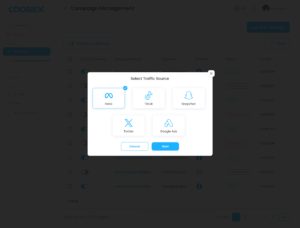
Social Media Ads module in Coonex allows users to create, manage, and monitor ad campaigns across multiple platforms — including Meta (Facebook & Instagram), TikTok, Snapchat, Twitter, and Google Ads — all from a single dashboard.
This module simplifies paid advertising by combining campaign setup, targeting, budgeting, and performance tracking into one intuitive workflow.
1. Overview #
With Coonex Social Ads, you can:
- Launch ads across multiple social platforms in a few clicks.
- Manage all campaign settings from one dashboard.
- Save time and avoid technical ad account setup or pixel troubleshooting.
- Get real-time results integrated into your CRM dashboard.
2. Creating a New Campaign #
To create a new ad campaign:
- Navigate to Marketing → Social Media Ads → Add New Campaign.
- Follow the guided 5-step creation process.
Step 1: Traffic Source & Objective #
Choose your advertising platform and goal.
Step 2: Target Audience #
Define who should see your ad.
Step 3: Creatives #
Upload your ad materials and customize engagement elements.
Step 4: Set Budget & Schedule #
Define how much you want to spend and when your campaign should run.
Step 5: Review & Publish #
Preview all campaign details before launching.
- Check targeting, creatives, and budget.
- Click Confirm to submit the campaign.
- Once reviewed by a Coonex Marketing Expert, it goes live across selected platforms.
3. Campaign Management Dashboard #
After publishing, all campaigns appear in the Social Media Ads Dashboard, where you can:
- View all active and inactive campaigns.
- Filter by platform, objective, or date range.
- Track reach, spend, and performance metrics.
- Pause or activate campaigns directly.
4. Expert Review Process #
Before your campaign goes live, a Coonex Marketing Expert reviews all settings to ensure:
- Targeting and audience setup are relevant.
- Creatives follow each platform’s advertising policies.
- Budget allocation is optimized for performance.
- The objective aligns with your desired outcome (Leads, Awareness, etc.).
This review guarantees your ads meet both compliance and quality standards.
5. Reporting & Integration #
All campaign data is automatically integrated into:
- CRM Reports Dashboard (to measure lead cost, ROI, and source).
- AI Lead Scoring System (to prioritize leads by platform quality).
- Performance Analytics under Reports → Marketing Overview.
6. Best Practices #
- Always define a clear campaign objective before launching.
- Use short, engaging captions and high-quality visuals.
- Choose Daily Budget for testing; switch to Total Budget for long campaigns.
- Monitor campaign results weekly and adjust targeting if needed.
- Keep CTA consistent with your landing page (e.g., “Book a Viewing” → property detail page).


