
Coonex Coonex
  • Home
  • Solutions

    Discover our Products & Solutions

    See what's new
    Coonex CRM

    Friendly CRM for Tracking, Nurturing, and Closing Deals Together

    Coonex Website Builder

    Drag-and-Drop CMS for Effortless Website Creation

    Coonex Pay Per Qualified Lead

    Generate leads effortlessly, no Social media Ads expertise required.

    Coonex Chat

    A centralized inbox to manage WhatsApp and social inquiries in one smart dashboard

    Coonex Social Post

    Manage, schedule, and organize all Social Media from one dashboard with clear performance insights.

    Coonex AI Video Generator

    AI-powered real estate videos designed to boost engagement and conversions

    Know More now
    Effortless Real Estate Success
    CRM
    Mobile Apps
    Paid ads
    CMS
    • PROFESSIONAL SOLUTIONS
    • Real Estate Agencies
    • Real Estate Developers
    • Digital Management
    • GET STARTED IS EASY!
    • Sign up FREE
    • Log in
    • Get in touch
  • Services
    Social Media Management

    Full management of your real estate social accounts. Consistent content, active engagement, and strong brand presence.

    Digital Strategy

    A clear marketing roadmap that connects branding with sales. Defined channels, budgets, and measurable goals.

    CRO

    Optimize landing pages and funnels to increase conversion rates and lower cost per lead. Same traffic, better results.

    Paid Ads Management

    Professional ad management across Meta, Google, and TikTok with daily optimization and performance tracking.

    Influencer Campaign

    Targeted influencer campaigns to build trust and reach new property buyers.

    Branding

    Build a strong real estate brand identity that stands out in a competitive market

    SEO

    Rank higher on search engines and attract organic property buyers without ongoing ad spend.

    Lead Generation

    Generate serious property leads through data-driven strategies and the right acquisition channels

    Scale Without Building a Marketing Team
    Scale Without Building a Marketing Team

    We becomes your outsourced marketing engine. We manage everything. You close the deals

    Book your FREE Consultation Now
  • Who It’s For
    Solutions For

    For Real Estate Agencies

    Manage multiple agents, track listings, centralize communication, and scale outreach with a real estate-ready CRM.

    For Developers

    Showcase your projects, capture leads, assign them to sales teams, and track performance—all from one powerful dashboard.

    For Marketing

    Run targeted campaigns, integrate with social platforms, and track ROI in real time—powered by Coonex's all-in-one marketing suite.

    • PROFESSIONAL SOLUTIONS
    • Real Estate Agencies
    • Real Estate Developers
    • Digital Management
    • GET STARTED IS EASY!
    • Sign up FREE
    • Log in
    • Get in touch
  • Contact us
  • Documentation
Log in
Sign up for FREE
En
  • English
  • العربية
Coonex Coonex
  • Home
  • Solutions
    • CRM
    • CMS
    • Lead Generation System
    • Coonex Chat
    • Coonex Social Post
  • Services
    • Influencer Marketing
    • Digital Management
    • Social Media Management
    • Paid ads
    • Brand Development for Real Estate
    • SEO
    • CRO
  • For Who?
    • Developer Solutions
    • Real Estate Agency Solutions
  • Contact us
  • Documentation
  • العربية
  • Create an account
  • Log in

System Overview

3
  • Coonex System Overview
  • Real Estate Ecosystem & Lead Lifecycle
  • Coonex Hybrid Model: Software + Marketing Engine

Getting Started

1
  • Account Setup & Login

CRM

9
  • Dashboard
  • Leads & Contacts Management
  • CRM Reports & Analytics
  • Documents Management
  • Contacts & Organizations
  • Meetings & Calendar
  • Task Management
  • Projects & Properties Management
  • Lead Duplication Prevention and Validation

CMS (Website Builder)

1
  • CMS

Marketing & Automation

2
  • Pay-Per-Lead (PPL) System
  • Social Media Ads

Settings & Permission

3
  • Profile Settings
  • Lead Rotation Settings
  • Settings & Permission

Data & Privacy

1
  • Data & Privacy
View Categories
  • Home
  • Docs
  • CRM
  • Dashboard

Dashboard

2 min read

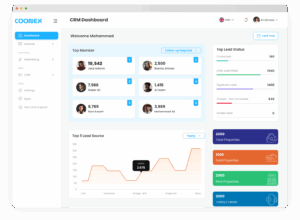
The Coonex Dashboard is your real-time control center.
It gives you a complete snapshot of your company’s performance — from sales activity and lead sources to agent productivity and campaign results — all in one screen.


1. Overview #

The dashboard aggregates live data from all system modules (CRM, Tasks, Projects, Ads, and Reports) to give managers and agents instant visibility into their performance.

Key Highlights:

  • View total leads, properties, and revenue at a glance.
  • Monitor top-performing agents.
  • Track daily tasks and sales progress.
  • Analyze lead sources and conversion trends.

2. Top Members Widget #

This section displays the top-performing team members based on:

  • Closed Deals
  • Contacts Handled
  • Calls Made
  • Revenue Generated

Each member card shows:

  • Profile name and role.
  • Number of deals closed.
  • Total calls or client contacts.
  • Current sales revenue (linked to CRM deals).

Tip: Managers can use this widget to recognize high performers and track workload balance across the sales team.


3. Sales Revenue Overview #

Displays your total revenue performance over time — helping you measure business growth and identify top-selling months.

MetricDescription
Total RevenueSum of all closed deals (converted leads).
Revenue TrendLine graph showing growth by month.
CurrencyAutomatically displayed in the system’s default currency (e.g., AED, SAR, USD).

4. Leads Source Data #

Shows where your leads are coming from — giving you a clear picture of which platforms drive the best results.

Source TypeExamples
Social PlatformsFacebook, TikTok, Snapchat
Search AdsGoogle Ads
Messaging ChannelsWhatsApp
Direct / ManualEntered manually in CRM

Insight: The system updates these metrics in real time as new leads sync from active Coonex campaigns.


5. Top Lead Status (Last 30 Days) #

Visual chart summarizing the current state of all leads in your CRM.
Each status (e.g., New, Contacted, Negotiation, Offer Submitted, Closed) shows total count and percentage.

Why It Matters:
You can identify pipeline bottlenecks — for example, if many leads remain “New” or “No Response,” your team may need faster follow-ups.


6. Properties Summary #

This widget shows property-level insights directly linked to your CRM listings.

MetricDescription
Total PropertiesAll active listings in CRM.
Sold PropertiesProperties marked as sold.
Rent PropertiesActive rental listings.

7. Today’s Activities #

Displays the latest actions recorded by your team — including calls, meetings, or follow-ups.

“No data until now”

Once agents log activity (e.g., “Call made” or “Meeting completed”), this section updates automatically.


8. Tasks Overview #

Pie chart displaying the current distribution of tasks by status:

  • To Do
  • In Progress
  • Review
  • Done

Each category shows a percentage value to visualize completion progress.

Use Case: Managers can instantly identify pending work and agents who may need assistance closing tasks.


9. One-Click WhatsApp Integration #

From the dashboard, you can directly contact your clients via WhatsApp.
Clicking the WhatsApp icon beside a lead opens the chat instantly — no need to copy or save numbers.

This helps your sales team follow up instantly from the dashboard itself.


10. Data Privacy & Masking #

Sensitive data — such as client phone numbers or emails — is protected under the same hover-to-reveal privacy system used in CRM.
Even on the dashboard, these details are partially masked to prevent screenshots or unauthorized copying.

Only users with the right access level (Admin / Manager) can view full data.


11. Real-Time Campaign Sync #

The dashboard automatically updates whenever new leads enter from:

  • Meta Ads (Facebook / Instagram)
  • TikTok Ads
  • Google Search Campaigns
  • Coonex AI Lead Generation Forms

No manual refresh is required — every new lead or conversion appears instantly, fully tagged by campaign source.


12. Best Practices #

  • Review the dashboard daily for quick performance insights.
  • Use Lead Source Data to decide which channels to scale.
  • Monitor Task Progress weekly for operational control.
  • Verify Top Members every month to identify star performers.
  • Keep all data synced by ensuring ad accounts stay connected in settings.
Updated on October 23, 2025

What are your Feelings

  • Happy
  • Normal
  • Sad

Share This Article :

  • Facebook
  • X
  • LinkedIn
  • Pinterest
Lead Duplication Prevention and ValidationLeads & Contacts Management
Table of Contents
  • 1. Overview
  • 2. Top Members Widget
  • 3. Sales Revenue Overview
  • 4. Leads Source Data
  • 5. Top Lead Status (Last 30 Days)
  • 6. Properties Summary
  • 7. Today’s Activities
  • 8. Tasks Overview
  • 9. One-Click WhatsApp Integration
  • 10. Data Privacy & Masking
  • 11. Real-Time Campaign Sync
  • 12. Best Practices

Designed to help Real estate agencies and developers scale faster with less effort.
Contact Us :
Innovation Hub – in5, Dubai Internet City, Dubai, United Arab Emirates
Phone: +971 54 486 8373

  • CRM
  • Web Builder
  • Lead Generation
  • Digital Management
  • Influencers Campaigns
  • Paid Ads Management
  • Pay Per Lead New
  • Pay Per Quilty Lead Exclusive
  • SMS & Whatsapp Marketing Soon
  • Sign Up
  • Sign in
  • Request a Free Quote Free
  • Contact us
  • FAQ
  • Pricing
  • Terms of service
  • Privacy policy

Coonex © 2025, All rights reserved.

  • Privacy & Policy
  • Term & Conditions
  • Cookie settings
  • Contact us
English
  • English
  • العربية

WhatsApp us
