

Coonex Pay-Per-Lead (PPL) system allows real estate businesses to receive a continuous flow of leads generated by Coonex marketing campaigns — without the need to manage ads or handle media budgets.
You pay only per delivered lead, regardless of qualification level, while the Coonex system ensures transparent reporting on volume, cost, and performance.
1. Overview #
Unlike the PPQL (Pay-Per-Quality-Lead) model, the PPL system focuses purely on lead delivery quantity.
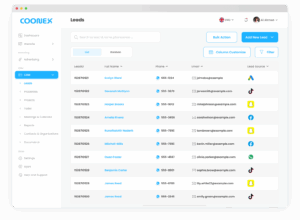
Each lead is sent directly to your CRM once captured through Coonex advertising campaigns.
Validation for duplicates or invalid numbers happens automatically, but quality filtering (interest or engagement level) is not included in this model.
Key Points:
- You pay for each lead delivered, not for “verified” or “qualified” leads.
- Coonex manages all ad setup and optimization.
- Real-time cost tracking and download options are available through the Insights dashboard.
2. Creating a PPL Campaign #
- Go to Marketing → Pay-Per-Lead → Add New Campaign.
- Complete the required fields:
- Campaign Name* — Give your campaign a descriptive title.
- Bid Range* — Define your minimum and maximum cost per lead (e.g., 50–150 AED).
- Total Budget* — Specify how much you’re willing to spend.
- Start / End Dates* — Select campaign duration.
- Click Confirm.
Your campaign will be reviewed by the Coonex marketing team and activated automatically.
3. Campaign List #
All active and inactive campaigns appear in the campaign list with the following data:
4. Campaign Insights #
The Insights section gives a complete performance view for each PPL campaign.
Note:
Leads are considered delivered once received successfully in your CRM.
No further qualification or scoring is applied under the PPL model — that feature belongs exclusively to PPQL.
5. Lead Delivery Flow #
- A user interacts with your Coonex ad campaign.
- The lead’s form data is captured and validated for basic accuracy (no duplicates or empty fields).
- The record is instantly created in your CRM as a New Lead.
- You are billed for that lead entry.
6. Billing & Payment #
- Charges apply per lead delivered to your CRM, regardless of engagement or qualification.
- Amounts are displayed in your Insights → Amount Spent column.
- Once your total budget limit is reached, the campaign pauses automatically.
7. Downloading Leads #
Use the Download Leads button to export all delivered leads.
Export includes:
- Name
- Phone number
- Email (if captured)
- Campaign source (Meta, TikTok, Google)
- Delivery date
8. Best Practices #
- Review Cost per Lead regularly to monitor performance.
- Use PPL for volume-based campaigns focused on database growth.
- Upgrade to PPQL when you want to pay only for qualified or engaged leads.
- Keep CRM stages updated to help optimize future targeting.
- Download leads daily for fast follow-up and better conversion rates.


