

The Leads & Contacts module in Coonex is where all your client and prospect data is managed.
It unifies every lead from your marketing campaigns, website forms, or WhatsApp inquiries in one secure dashboard — designed for speed, privacy, and real-time automation.
1. Overview #
This module enables sales teams to:
- View and manage all leads in one place.
- Communicate directly with clients via one-click WhatsApp.
- Automatically receive new leads from Coonex Ad Campaigns.
- Work securely through the smart data masking system that hides sensitive info from screenshots or unauthorized access.
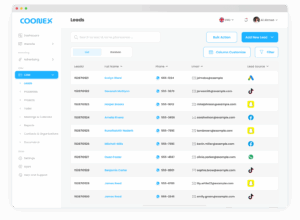
2. Smart Data Privacy Protection #
Coonex uses advanced data masking to protect sensitive client details such as phone numbers and emails.
- Data is hidden by default in the leads table.
- When the user hovers the mouse over a field, the value appears temporarily.
- Once the mouse leaves the field, the data is hidden again.
- This prevents data leaks, screenshots, and unauthorized exports — especially important in teams with high turnover or external access.
🖼️ Add screenshot: “Hover-to-Reveal Data Example”
Benefit:
You maintain full control over client information while allowing authorized users to access what they need to work effectively.
3. One-Click WhatsApp Communication #
Each lead record includes a WhatsApp chat icon.
Clicking it automatically opens a WhatsApp conversation with that client — either on desktop (web.whatsapp.com) or the mobile app.
This direct integration helps your team respond instantly, reduce friction, and increase the chance of converting leads.
4. Automatic Lead Sync from Coonex Campaigns #
Coonex CRM automatically syncs all leads generated from your active ad campaigns — including Meta, TikTok, Google, and WhatsApp campaigns.
How It Works:
- A user submits a form or message through an active Coonex campaign.
- Coonex automatically validates and sends the lead data to your CRM.
- The new lead appears instantly under the correct campaign source (e.g., Meta Ads, TikTok Leads, etc.).
Integration Advantage:
This ensures your marketing and sales teams always work in real time — every new lead appears within seconds of generation.
5. Lead Filters & Search #
The CRM includes a smart filter panel to help teams locate leads easily.
You can combine multiple filters for precise targeting and export filtered results if your role allows it.
8. Import Leads (Excel / CSV) #
If you already have leads stored in a file, Coonex allows you to upload them all at once.
Excel Template Columns #
Automatic Validation #
During import:
- Duplicated phone numbers or emails are detected automatically.
- Invalid rows are flagged for correction.
- Only valid records are added to the CRM.
After completion, you can check the Import History Log to view:
- Total leads imported
- Rejected rows
- Reasons for rejection
9. Data Security & Permissions #
- Sensitive data (phone, email) remains masked for non-admin users.
- Export, edit, or delete rights depend on user roles.
- All activities — import, edit, delete, or reassignment — are logged under Audit Trail for full visibility.
- Data is encrypted at rest and in transit using AES-256 encryption.
10. Best Practices #
- Always communicate through the CRM’s WhatsApp button to maintain log tracking.
- Review new leads daily, especially those synced automatically from campaigns.
- Keep statuses updated after each interaction.
- Avoid sharing screenshots of lead data — masking ensures privacy for a reason.
- Validate your Excel sheet before import to prevent rejected entries.


