
Coonex Coonex
  • Home
  • Solutions

    Discover our Products & Solutions

    See what's new
    Coonex CRM

    Friendly CRM for Tracking, Nurturing, and Closing Deals Together

    Coonex Website Builder

    Drag-and-Drop CMS for Effortless Website Creation

    Coonex Pay Per Qualified Lead

    Generate leads effortlessly, no Social media Ads expertise required.

    Coonex Chat

    A centralized inbox to manage WhatsApp and social inquiries in one smart dashboard

    Coonex Social Post

    Manage, schedule, and organize all Social Media from one dashboard with clear performance insights.

    Coonex AI Video Generator

    AI-powered real estate videos designed to boost engagement and conversions

    Know More now
    Effortless Real Estate Success
    CRM
    Mobile Apps
    Paid ads
    CMS
    • PROFESSIONAL SOLUTIONS
    • Real Estate Agencies
    • Real Estate Developers
    • Digital Management
    • GET STARTED IS EASY!
    • Sign up FREE
    • Log in
    • Get in touch
  • Services
    Social Media Management

    Full management of your real estate social accounts. Consistent content, active engagement, and strong brand presence.

    Digital Strategy

    A clear marketing roadmap that connects branding with sales. Defined channels, budgets, and measurable goals.

    CRO

    Optimize landing pages and funnels to increase conversion rates and lower cost per lead. Same traffic, better results.

    Paid Ads Management

    Professional ad management across Meta, Google, and TikTok with daily optimization and performance tracking.

    Influencer Campaign

    Targeted influencer campaigns to build trust and reach new property buyers.

    Branding

    Build a strong real estate brand identity that stands out in a competitive market

    SEO

    Rank higher on search engines and attract organic property buyers without ongoing ad spend.

    Lead Generation

    Generate serious property leads through data-driven strategies and the right acquisition channels

    Scale Without Building a Marketing Team
    Scale Without Building a Marketing Team

    We becomes your outsourced marketing engine. We manage everything. You close the deals

    Book your FREE Consultation Now
  • Who It’s For
    Solutions For

    For Real Estate Agencies

    Manage multiple agents, track listings, centralize communication, and scale outreach with a real estate-ready CRM.

    For Developers

    Showcase your projects, capture leads, assign them to sales teams, and track performance—all from one powerful dashboard.

    For Marketing

    Run targeted campaigns, integrate with social platforms, and track ROI in real time—powered by Coonex's all-in-one marketing suite.

    • PROFESSIONAL SOLUTIONS
    • Real Estate Agencies
    • Real Estate Developers
    • Digital Management
    • GET STARTED IS EASY!
    • Sign up FREE
    • Log in
    • Get in touch
  • Contact us
  • Documentation
Log in
Sign up for FREE
En
  • English
  • العربية
Coonex Coonex
  • Home
  • Solutions
    • CRM
    • CMS
    • Lead Generation System
    • Coonex Chat
    • Coonex Social Post
  • Services
    • Influencer Marketing
    • Digital Management
    • Social Media Management
    • Paid ads
    • Brand Development for Real Estate
    • SEO
    • CRO
  • For Who?
    • Developer Solutions
    • Real Estate Agency Solutions
  • Contact us
  • Documentation
  • العربية
  • Create an account
  • Log in

System Overview

3
  • Coonex System Overview
  • Real Estate Ecosystem & Lead Lifecycle
  • Coonex Hybrid Model: Software + Marketing Engine

Getting Started

1
  • Account Setup & Login

CRM

9
  • Dashboard
  • Leads & Contacts Management
  • CRM Reports & Analytics
  • Documents Management
  • Contacts & Organizations
  • Meetings & Calendar
  • Task Management
  • Projects & Properties Management
  • Lead Duplication Prevention and Validation

CMS (Website Builder)

1
  • CMS

Marketing & Automation

2
  • Pay-Per-Lead (PPL) System
  • Social Media Ads

Settings & Permission

3
  • Profile Settings
  • Lead Rotation Settings
  • Settings & Permission

Data & Privacy

1
  • Data & Privacy
View Categories
  • Home
  • Docs
  • Marketing & Automation
  • Social Media Ads

Social Media Ads

3 min read

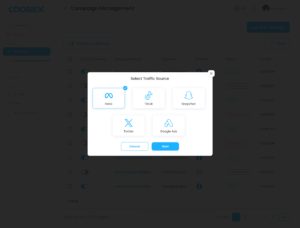
Social Media Ads module in Coonex allows users to create, manage, and monitor ad campaigns across multiple platforms — including Meta (Facebook & Instagram), TikTok, Snapchat, Twitter, and Google Ads — all from a single dashboard.

This module simplifies paid advertising by combining campaign setup, targeting, budgeting, and performance tracking into one intuitive workflow.


1. Overview #

With Coonex Social Ads, you can:

  • Launch ads across multiple social platforms in a few clicks.
  • Manage all campaign settings from one dashboard.
  • Save time and avoid technical ad account setup or pixel troubleshooting.
  • Get real-time results integrated into your CRM dashboard.

2. Creating a New Campaign #

To create a new ad campaign:

  1. Navigate to Marketing → Social Media Ads → Add New Campaign.
  2. Follow the guided 5-step creation process.

Step 1: Traffic Source & Objective #

Choose your advertising platform and goal.

FieldDescription
Traffic SourceChoose one or more platforms: Meta, TikTok, Snapchat, Twitter, Google Ads.
ObjectiveSelect the goal of your campaign: Brand Awareness, Lead Generation, Engagement, Traffic.


Step 2: Target Audience #

Define who should see your ad.

FieldDescription
Campaign Name*Internal name to identify your campaign.
Country / City*Select the target location(s).
Age Range*Set minimum and maximum ages.
Gender*Choose Male, Female, or All.
Interests*Add target interests (e.g., Real Estate Investing, Property Buying).
Languages*Select one or multiple languages.


Step 3: Creatives #

Upload your ad materials and customize engagement elements.

FieldDescription
Primary Text*The main ad caption or description.
Website Link*The URL users will visit after clicking your ad.
Call to Action*Choose from CTA options (e.g., Learn More, Contact Us, Book Now).
Upload File*Upload your image or video creative (JPG, PNG, MP4).


Step 4: Set Budget & Schedule #

Define how much you want to spend and when your campaign should run.

FieldDescription
Budget Type*Choose between Daily Budget or Total Budget.
Daily Budget*Example: 200 AED/day.
Start Date / End Date*Set campaign duration.
Bid Type*Choose Auto Bid or Cost per Result.


Step 5: Review & Publish #

Preview all campaign details before launching.

  • Check targeting, creatives, and budget.
  • Click Confirm to submit the campaign.
  • Once reviewed by a Coonex Marketing Expert, it goes live across selected platforms.


3. Campaign Management Dashboard #

After publishing, all campaigns appear in the Social Media Ads Dashboard, where you can:

  • View all active and inactive campaigns.
  • Filter by platform, objective, or date range.
  • Track reach, spend, and performance metrics.
  • Pause or activate campaigns directly.
ColumnDescription
Campaign NameInternal name of the campaign.
ObjectiveAwareness, Lead Generation, etc.
PlatformMeta, TikTok, etc.
StatusActive / Paused / Completed.
BudgetTotal or daily spend amount.
Start / End DateCampaign duration.
ReachNumber of unique users reached.


4. Expert Review Process #

Before your campaign goes live, a Coonex Marketing Expert reviews all settings to ensure:

  • Targeting and audience setup are relevant.
  • Creatives follow each platform’s advertising policies.
  • Budget allocation is optimized for performance.
  • The objective aligns with your desired outcome (Leads, Awareness, etc.).

This review guarantees your ads meet both compliance and quality standards.


5. Reporting & Integration #

All campaign data is automatically integrated into:

  • CRM Reports Dashboard (to measure lead cost, ROI, and source).
  • AI Lead Scoring System (to prioritize leads by platform quality).
  • Performance Analytics under Reports → Marketing Overview.


6. Best Practices #

  • Always define a clear campaign objective before launching.
  • Use short, engaging captions and high-quality visuals.
  • Choose Daily Budget for testing; switch to Total Budget for long campaigns.
  • Monitor campaign results weekly and adjust targeting if needed.
  • Keep CTA consistent with your landing page (e.g., “Book a Viewing” → property detail page).
Updated on October 23, 2025

What are your Feelings

  • Happy
  • Normal
  • Sad

Share This Article :

  • Facebook
  • X
  • LinkedIn
  • Pinterest
Pay-Per-Lead (PPL) SystemPay-Per-Lead (PPL) System
Table of Contents
  • 1. Overview
  • 2. Creating a New Campaign
    • Step 1: Traffic Source & Objective
    • Step 2: Target Audience
    • Step 3: Creatives
    • Step 4: Set Budget & Schedule
    • Step 5: Review & Publish
  • 3. Campaign Management Dashboard
  • 4. Expert Review Process
  • 5. Reporting & Integration
  • 6. Best Practices

Designed to help Real estate agencies and developers scale faster with less effort.
Contact Us :
Innovation Hub – in5, Dubai Internet City, Dubai, United Arab Emirates
Phone: +971 54 486 8373

  • CRM
  • Web Builder
  • Lead Generation
  • Digital Management
  • Influencers Campaigns
  • Paid Ads Management
  • Pay Per Lead New
  • Pay Per Quilty Lead Exclusive
  • SMS & Whatsapp Marketing Soon
  • Sign Up
  • Sign in
  • Request a Free Quote Free
  • Contact us
  • FAQ
  • Pricing
  • Terms of service
  • Privacy policy

Coonex © 2025, All rights reserved.

  • Privacy & Policy
  • Term & Conditions
  • Cookie settings
  • Contact us
English
  • English
  • العربية

WhatsApp us
